How Superfiliate Billing Works
Last updated: September 22, 2026
Your Superfiliate subscription is billed through either Shopify or Stripe, depending on your plan. The provider decides where your charges appear, where you update your payment method, and where you find your invoices.
Which billing provider does my plan use?
Shopify-billed plans | Stripe-billed plans | |
|---|---|---|
Where charges appear | Your Shopify invoice | A separate Stripe invoice |
Where you manage billing | Shopify admin | Superfiliate Settings → Billing → Manage in Stripe |
Appears on Shopify invoices | Yes | No |
When you're charged
Superfiliate bills monthly, based on your subscription's renewal date. Each billing period starts on the date your subscription began or last renewed. It does not necessarily start on the first day of the calendar month or end on the last day.
For example, a subscription that started on the 14th renews on the 14th of each month.
Shopify-billed plans
For plans billed through Shopify, your Superfiliate charges appear on your regular Shopify invoice. You don't need to set up anything else to pay them.
View your billing cycle and charges
In your Shopify admin, go to Settings → Billing.
Scroll to the Subscriptions section to see your Superfiliate subscription and billing cycle details.
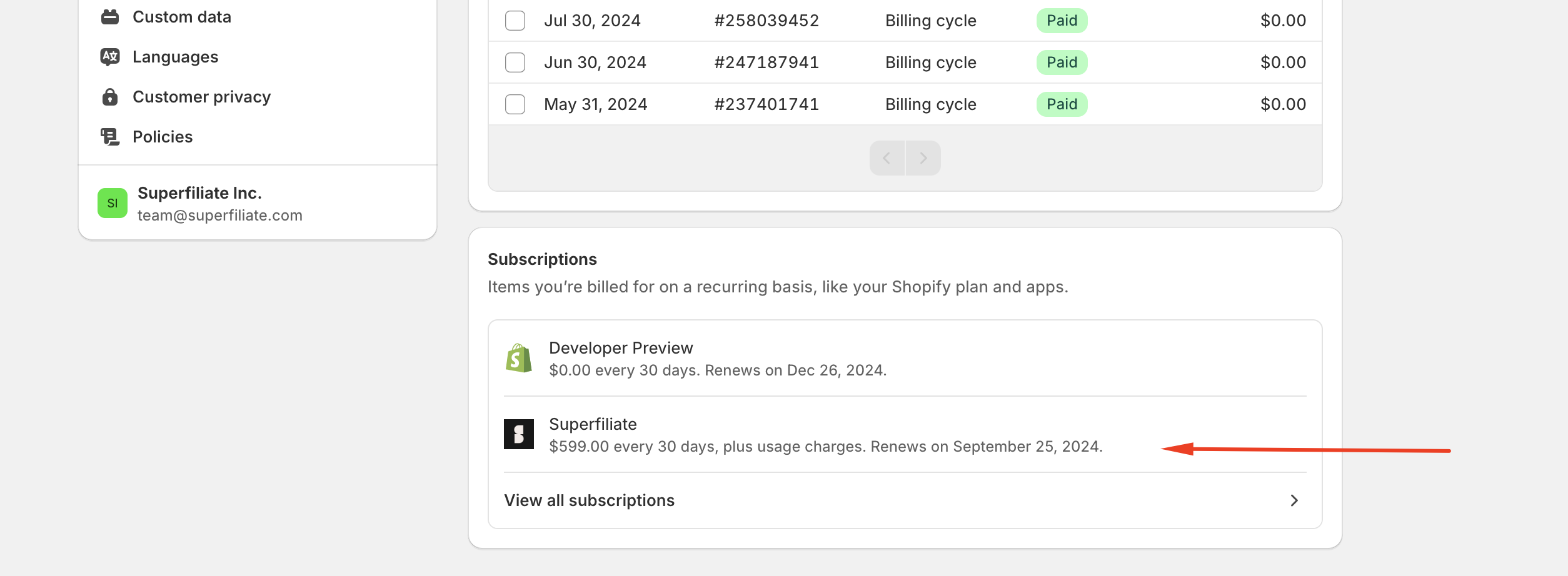
To learn how to read your Shopify invoice, see Shopify's invoice overview.
Stripe-billed plans
For plans billed through Stripe, you manage billing from Superfiliate. These charges do not appear on your Shopify invoice.
Manage your subscription and payment method
In Superfiliate, go to Settings → Billing.
Click Manage in Stripe.
From there, you can update your payment method and manage your subscription.
Plans with a usage or success fee
If your plan includes a usage or success fee, usage from approved conversions builds up over the billing period. It's then billed on your next Stripe invoice, together with your recurring platform fee.
To learn how the fee is calculated, see How the Success Fee Works.
Note: Usage fees are not charged automatically during a Stripe trial.
Need more help?
If you have a question about a charge, contact Superfiliate Support at hello@superfiliate.com and include:
The store or brand name on the account,
Your billing provider (Shopify or Stripe),
The invoice date and amount you're asking about,
A screenshot of the charge.