How to Boost organic posts in Meta Ads Suite
Last updated: May 12, 2026
Overview
The "Boost Organic Posts" feature lets you take an existing organic post from one of your creators and turn it into a paid Partnership Ad on Meta — preserving all the social proof (likes, comments, shares) the post has already earned.
Instead of creating ad creative from scratch, you select a real post that's already resonating with audiences and amplify it through paid distribution. The result is a Partnership Ad that shows the creator's name alongside your brand, combining authentic creator content with the targeting and reach of paid media.
Use this feature when you want to:
Amplify a creator's organic post that is already performing well
Run paid ads that carry real social proof — existing engagement stays visible on the promoted post
Launch Partnership Ads faster by skipping creative production and using content that's already live
Test which organic content performs best as a paid ad before investing in net-new creative
Important Limitations
Partnership approval is required
The creator must have granted your brand partnership ad permissions on Meta before you can boost their post. If partnership approval is not in place, the ad cannot be created. You can check a creator's partnership status in their profile within Superfiliate.Only Partnership Ads are supported
Superfiliate creates ads exclusively as Partnership Ads. You cannot boost a post as a standard (non-partnership) ad through the platform.The Social Listening workflow is available only when you access Social Listening through the Meta channel view
The Social Listening page — and its ability to browse and select organic posts for boosting — is accessible only when you navigate to it through the Meta channel context. If you are not viewing your brand through the Meta channel, the Social Listening entry point will not be available.The post must belong to a connected creator
You can only boost posts from creators who are part of your network in Superfiliate and have a connected social account.
Step-by-Step
Entry Point 1 — From the Social Listening Page
The Social Listening page lets you browse organic posts from your creators in one place, making it easy to spot high-performing content worth boosting.
Navigate to your Meta channel view in Superfiliate.
Open the Social Listening page from the channel navigation.
Filter "Meta Ads Partner" creators by using the Relationship Status filter
Find a post you want to boost and click on "Boost Content". You'll be redirected to the creation flow.
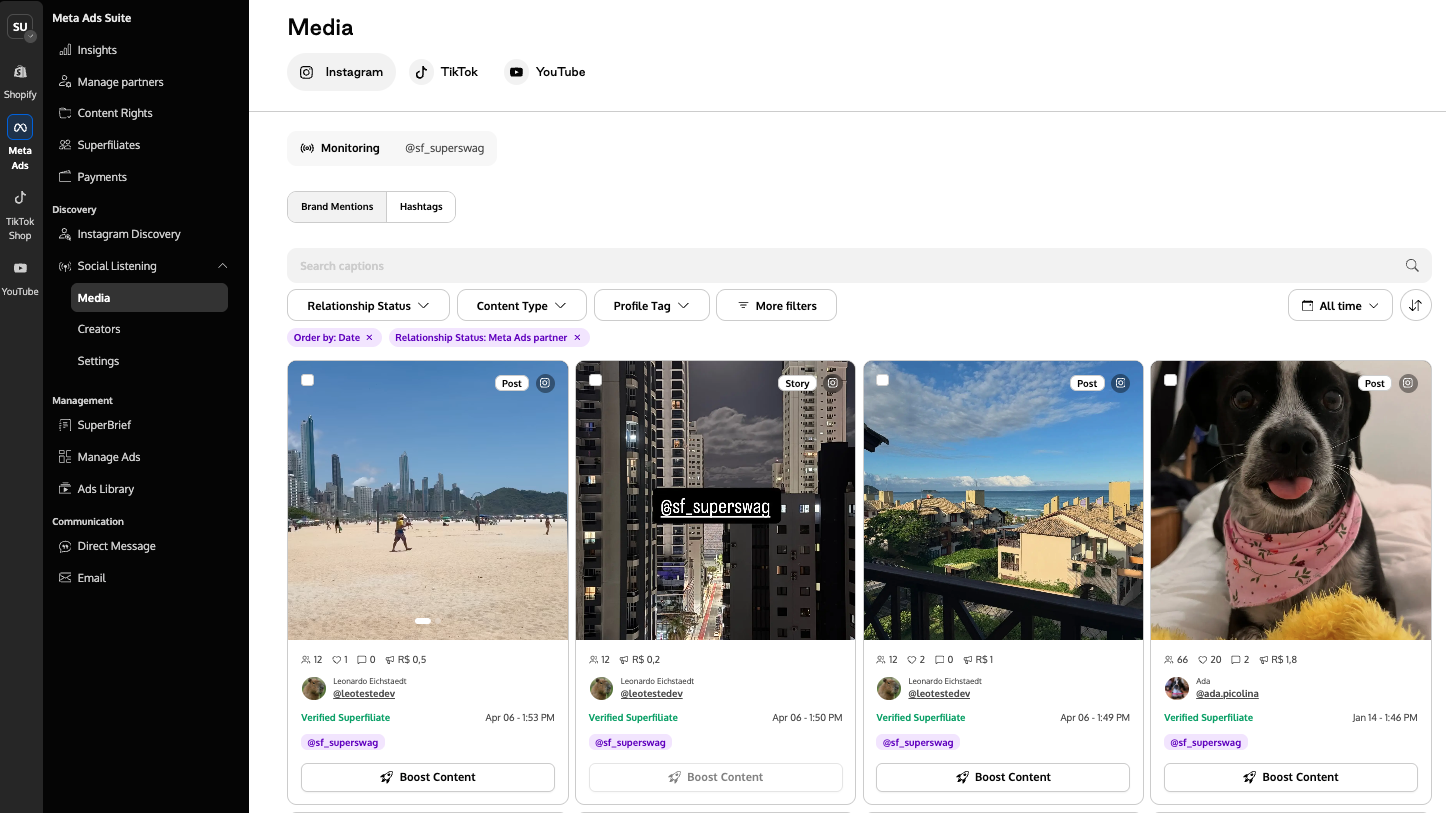
Meta doesn't allow boosting story posts. If you'd like to see only supported posts, use the content type filter.
Continue with audience targeting, budget, and other ad settings.
Review and launch the Partnership Ad.
Entry Point 2 — From the Ad Creation Flow
You can also start directly from the ad creation flow if you already have the post URL.
Navigate to Ad Creation in Superfiliate.
Begin creating a new Partnership Ad.
Select the creator associated with the post (they must have partnership approval granted).
When prompted for creative, select the option to create from an Instagram post.
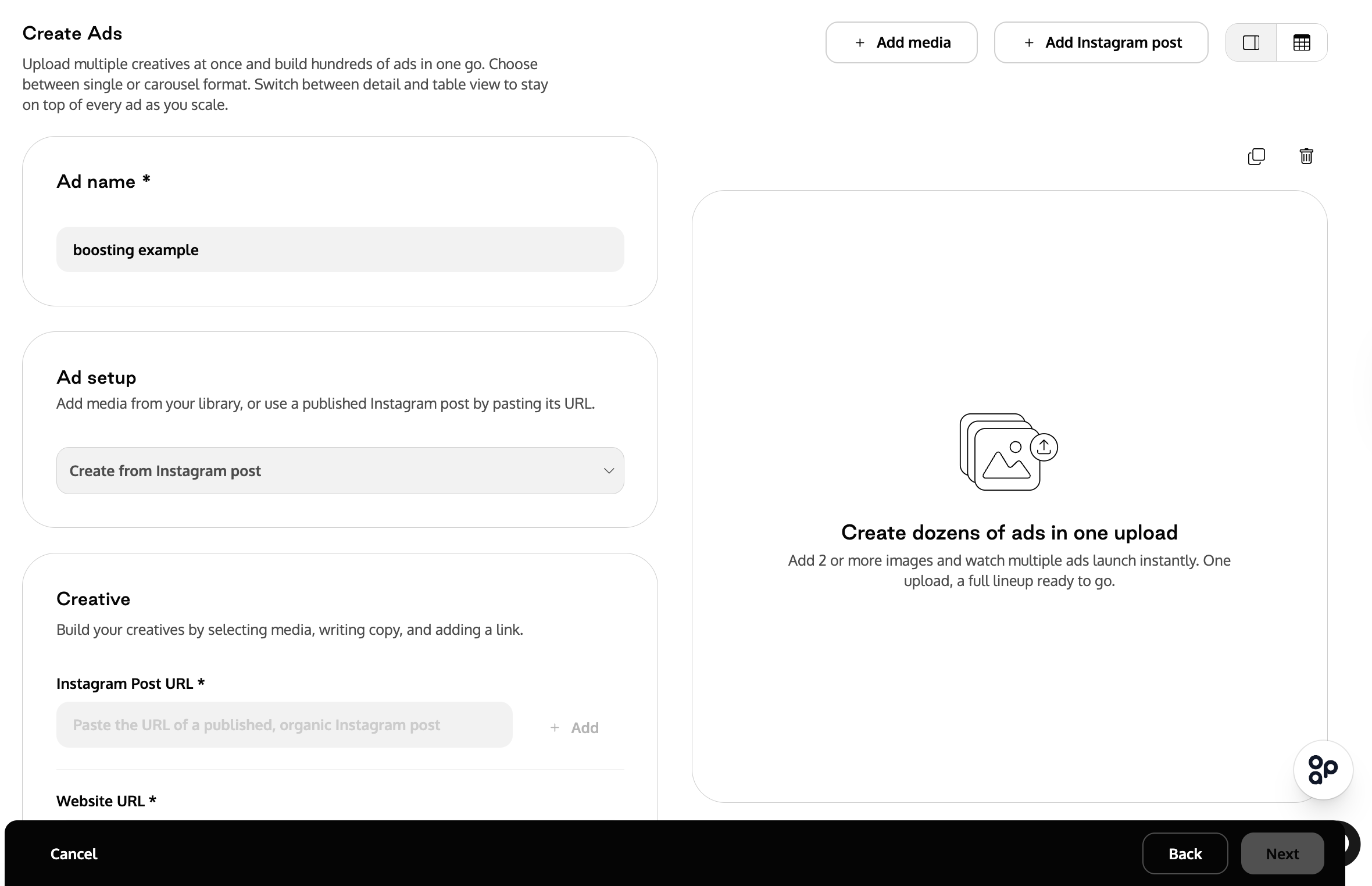
Paste the post URL (the direct Instagram link to the creator's organic post).
Superfiliate will fetch and display a preview of the post so you can confirm it is the right content.
Configure your ad settings:
Review the ad summary and launch the Partnership Ad.
If you'd like to boost in bulk, you can add multiple Instagram post URLs by clicking the "Add Instagram post" button.
Frequently Asked Questions (FAQ)
Can I boost any post from any creator?
No. The creator must be part of your Superfiliate network, have a connected social account, and have granted your brand partnership approval on Meta.
Does boosting remove or change the original post?
No. The original organic post remains exactly as is on the creator's profile. The ad is a separate entity that uses the post as its creative source.
Will the ad show the post's existing likes and comments?
Yes. That is the core benefit of boosting — the ad inherits the social proof from the organic post, which can improve click-through and conversion rates compared to a new creative with no engagement.
Can I edit the post content before boosting?
No. The ad uses the organic post exactly as it was published. If you need a different creative, create a new ad with a custom creative instead of boosting an existing post.
Why can't I see the Social Listening page?
The Social Listening page is only available when accessed through the Meta channel view. Make sure you are navigating Superfiliate within the Meta channel context.
What happens if the creator revokes approval of the partnership after I launch the ad?
If the creator removes partnership approval on Meta, the ad will stop delivering. You would need the creator to re-grant approval before the ad can run again.
Can I boost the same post more than once?
Yes. You can create multiple Partnership Ads from the same organic post with different targeting, budgets, or schedules.