Reset a Superfiliate's Reward Code
Last updated: January 28, 2025
If for some reason a Superfiliate needs you to reset their Reward Code (the code they use to redeem their Store Credit, which they've earned as a member of your Loyalty/Rewards program), you can easily generate a new Reward Code for them following a few simple steps.
Find the Superfiliate in your account
Search for the specific contact whose code you need to reset in either Management>Superfiliates or within the "Superfiliates" section of the specific Program they're in
Click to view their profile
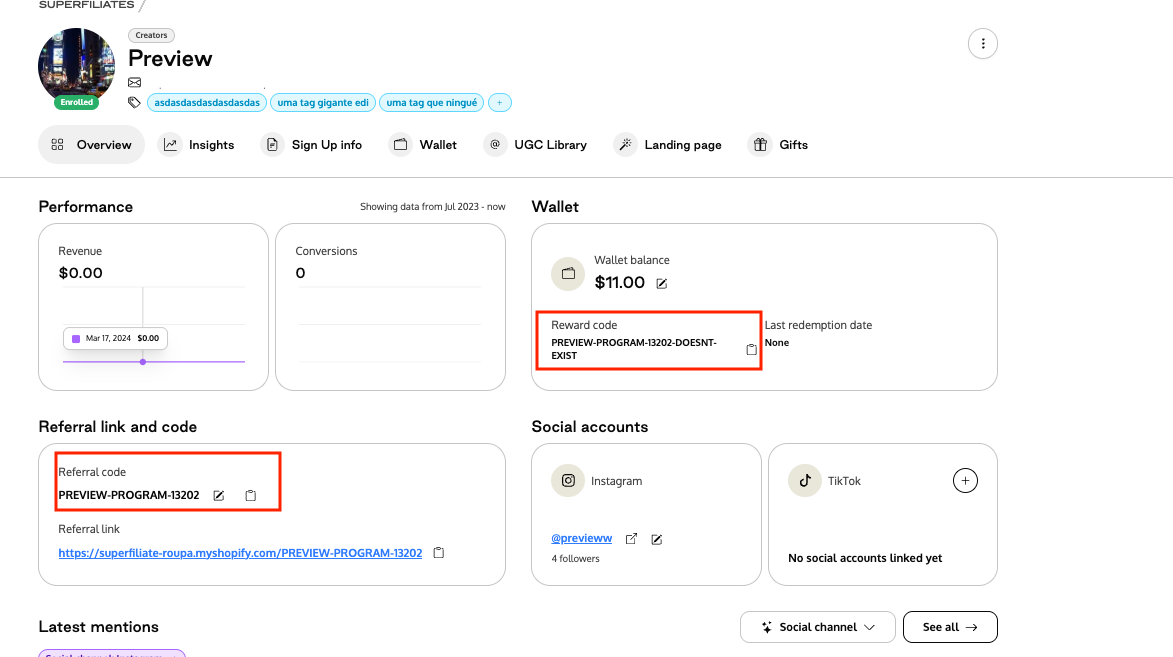
Copy/Paste their existing Referral Code externally
Make sure to SAVE their existing referral code (the code they share with their audience) somewhere safe. Save it before continuing.
Within Superfiliate, update their existing code to something else (only after saving their previous code)
Restore the Original Code in Superfiliate
Change the code back to the original and save it again.
This will generate a new Reward Code so they can redeem their Store Credit.