Tiktok Shop App: User Guide
Last updated: November 5, 2025
Latest Demo; July 22nd 2025
To schedule with our Tiktok Shop team, you can choose a slot directly from the calendly here.
Sign up
To get started with Tiktok Shop, go to this domain: https://www.superfiliate.com/tiktok-shop, click through the flow and then authenticate.
Authentication
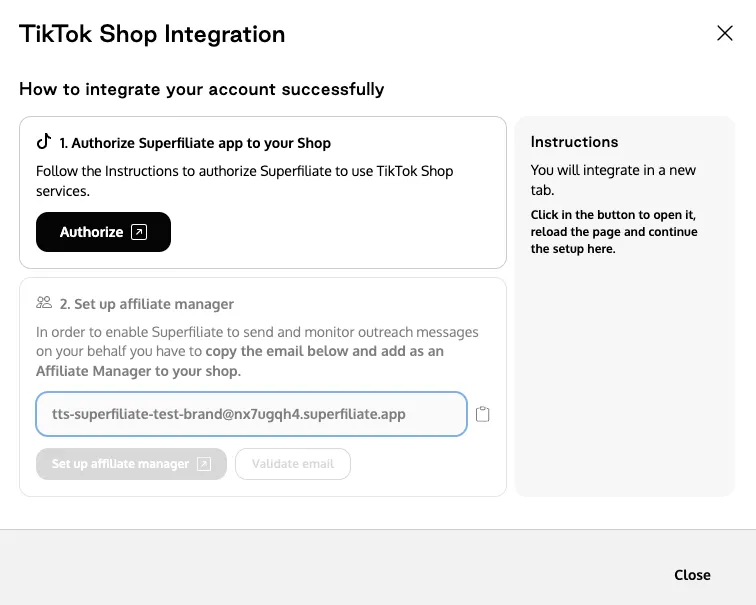
Using Superfiliate’s Tiktok Shop app requires you to Authorize access to your Tiktok Shop app. You do this easily by following the instructions on the screen as you sign up. We are asking for two types of authentication. One, authorize the API-access, and two, invite superfiliate as a collaborator in your Tiktok Shop. This enables us to both read information, but also to automatically send invites and messages on your behalf.
Finding creators
The Superfiliate app has two types of Discovery. Your Superfiliates and Creator Marketplace.
Your Superfiliates
Identify TikTok Shop users enrolled as Superfiliates or who have tagged your brand in their content. This feature helps in recognizing top-performing affiliates who actively promote your products.
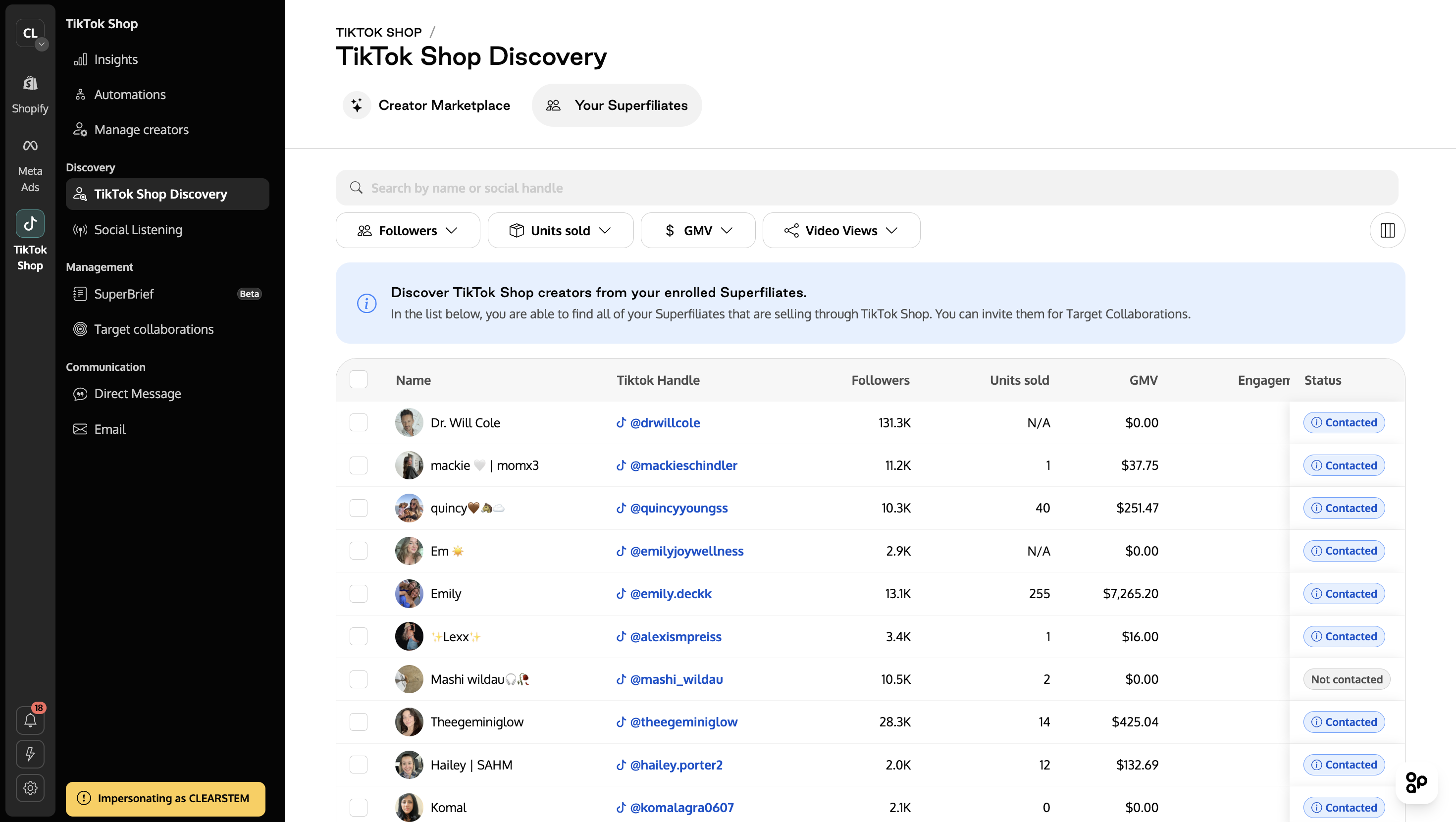
Access and sort based on performance metrics for each creator, including their TikTok Shop Gross Merchandise Value (GMV). GMV represents the total revenue generated by the creator across all brands on TikTok Shop.
Invite identified creators directly into your TikTok Shop affiliate program. This involves selecting products, setting approval preferences, and drafting personalized invitations to onboard them efficiently.
Creator Marketplace
After setting the desired filters, click on Generate List to compile the selection of creators.
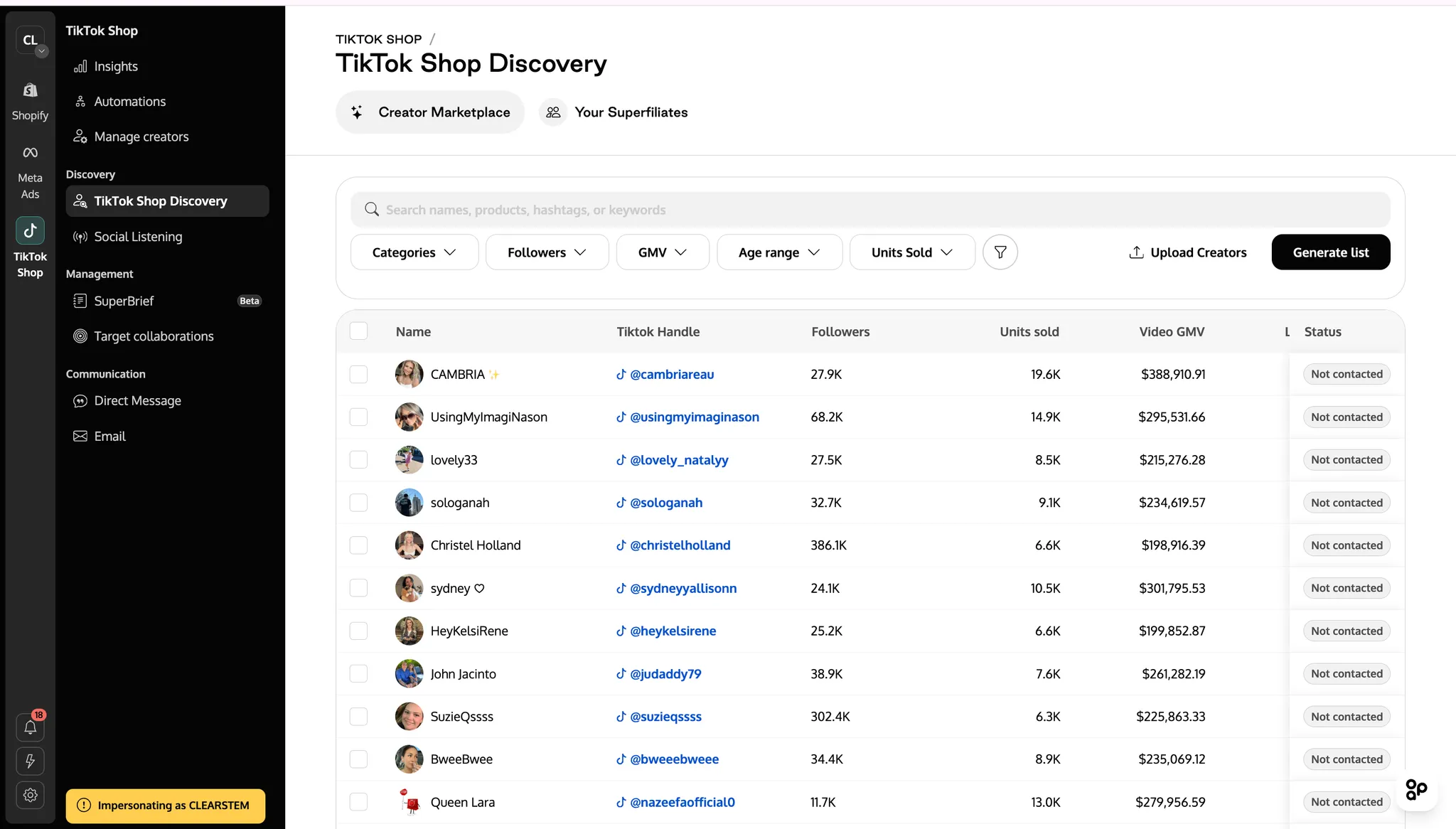
Review the Creator List: Examine the generated list to ensure that each creator's content aligns with your brand values and marketing goals.
Sort Creators: Organize creators based on criteria like follower count, engagement rate, or revenue generated. This helps in assessing their performance and relevance to your campaign.
Invite creators to target collaborations at Scale
Bulk Invite Creators and Customize Invitation Message
Select multiple creators to invite to your collaboration program simultaneously, with the ability to bulk invite up to 400 creators at once, streamlining the outreach process. Customize your invitations by creating a personalized message that includes:
Introduction to your brand.
Details about the collaboration opportunity.
Commission structure or rewards.
Requirements or timelines.
Once your message is finalized, send the bulk invitations to all selected creators, ensuring a tailored yet efficient outreach approach.
You can have multiple autopilots running at the same time in parallell.
Autopilot
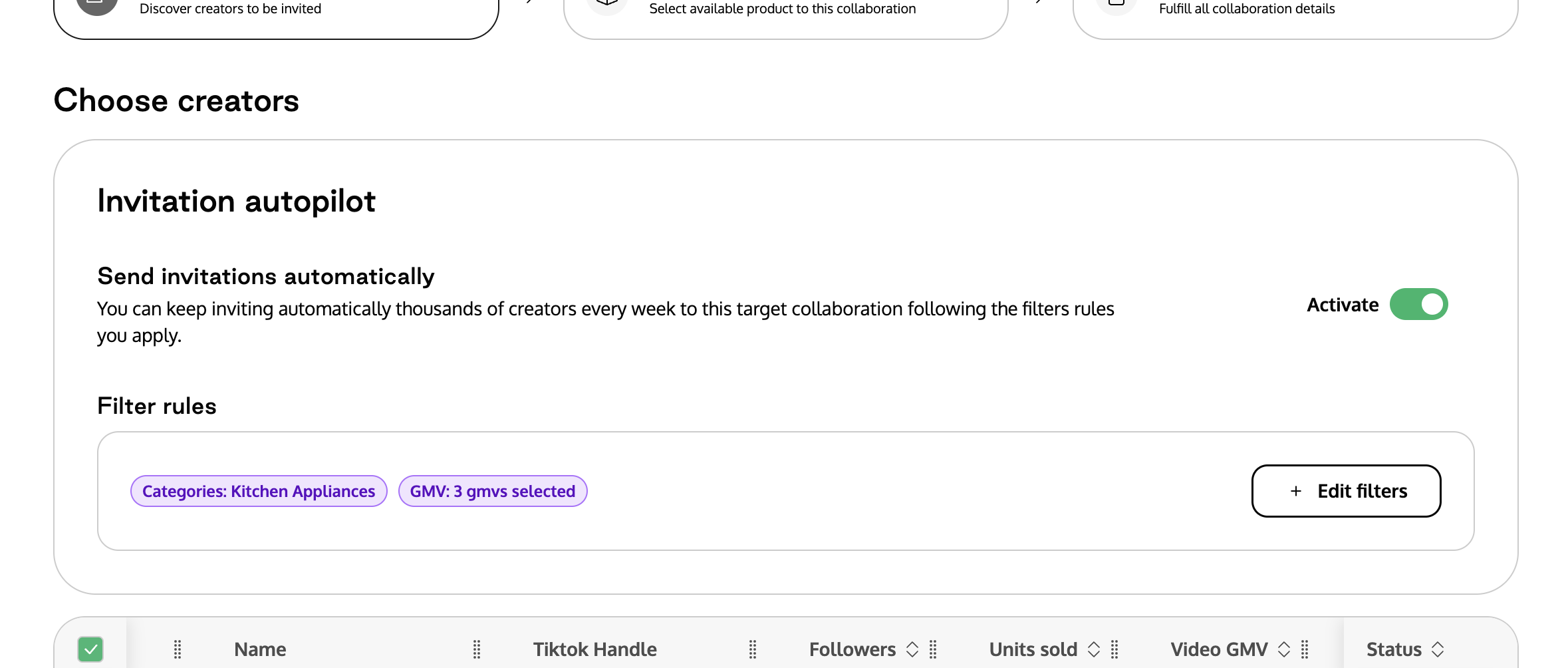
Autopilot automates the daily sending of collaboration invites to creators who match your specified filters in TikTok Shop. Once configured, it continuously updates the list of eligible creators and sends invitations without manual intervention.

Define the criteria for eligible creators by setting filters based on follower count, sales generated, audience demographics, and category. These filters determine which creators will receive automated invitations.
Enable the Autopilot feature to start the automated process. Once activated, Autopilot begins sending daily invitations to creators who meet your defined criteria.
Track the effectiveness of Autopilot by monitoring key performance metrics. This includes the number of invitations sent, acceptance rates, and the overall impact on your affiliate program's growth.
Track all content generated featuring your Tiktok Shop in the UGC Library
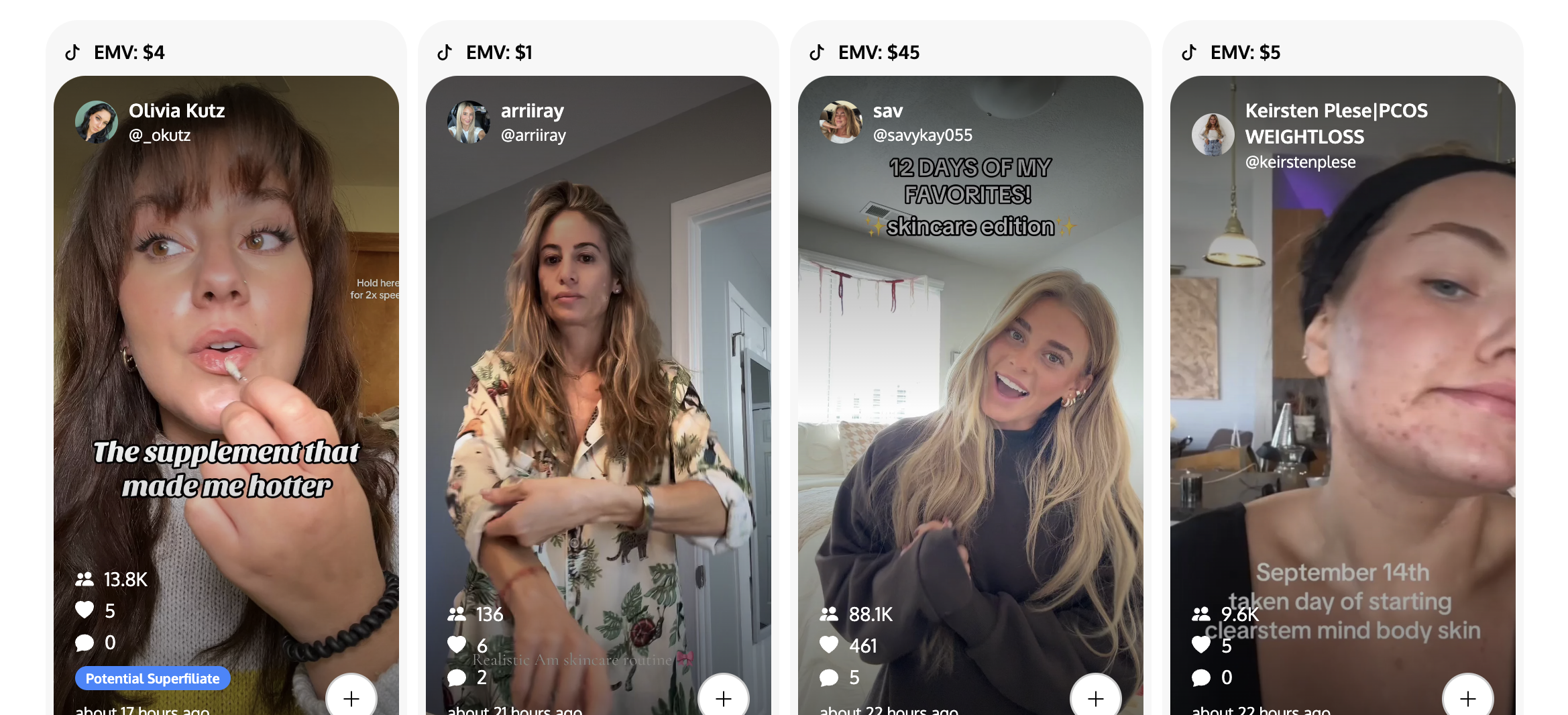
The UGC Library is a centralized location for all user-generated content (UGC) related to your TikTok Shop. It collects videos created by your store and affiliates, making it easy to access and manage. The library allows you to browse and search for specific content using filters like keywords or creators. Videos are displayed in an organized, visually clear format to help you quickly find, review, and use them in your marketing efforts.
Insights and Reporting
Videos
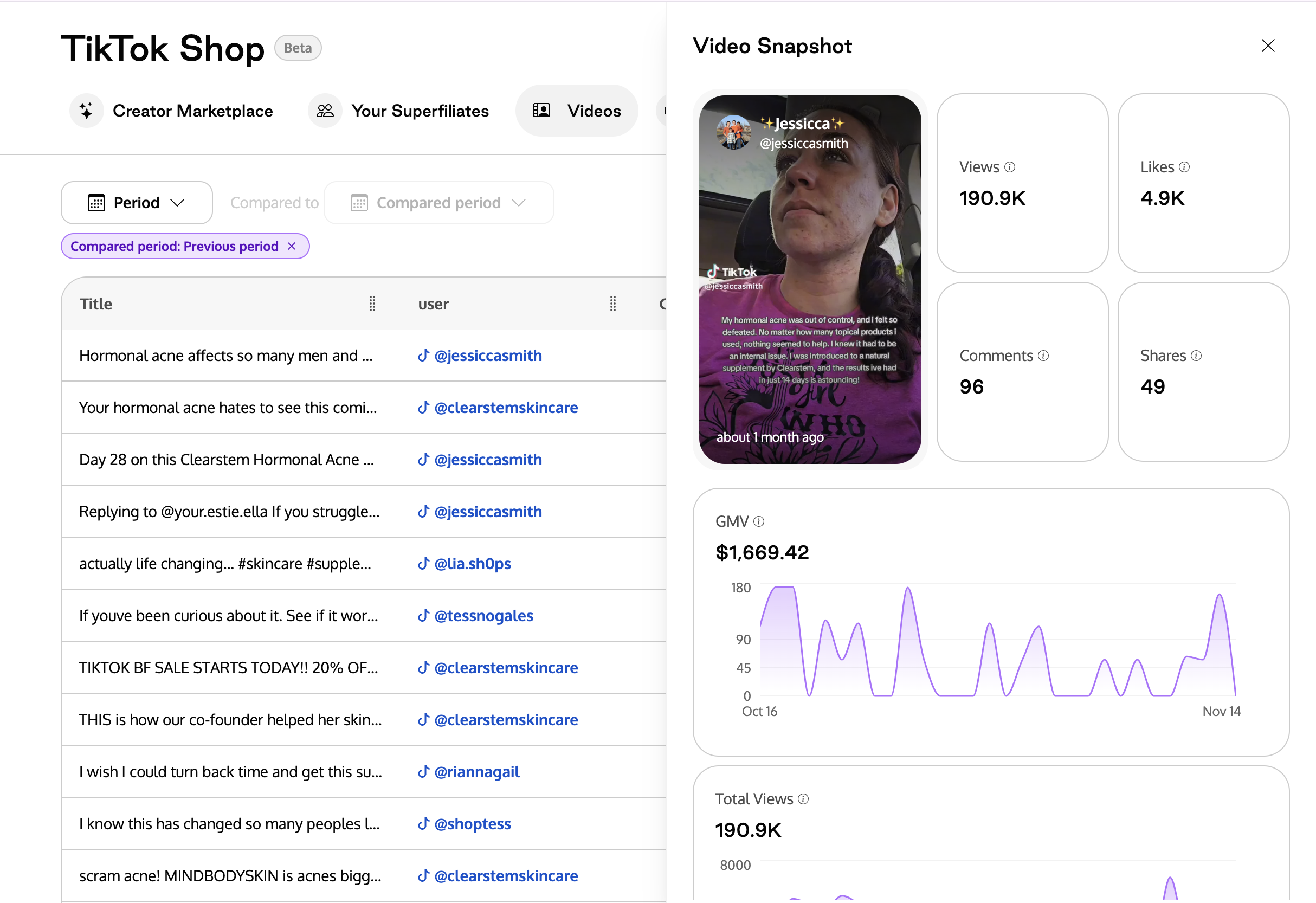
The centralized video dashboard consolidates all TikTok Shop videos, including those from your store and affiliates, into one organized space. With filtering options based on creator, date, or performance metrics, it’s easy to analyze content and track trends to find the best performing. Performance insights help you understand which videos drive engagement and conversions, enabling data-driven content strategies.
Creators
View all your affiliates in one place, along with their performance metrics. This centralized access simplifies the management of multiple creators and their contributions to your TikTok Shop. Track key performance indicators for each creator, such as sales generated and engagement rates. Use this data to manage and optimize your affiliate relationships effectively.
Shop Performance
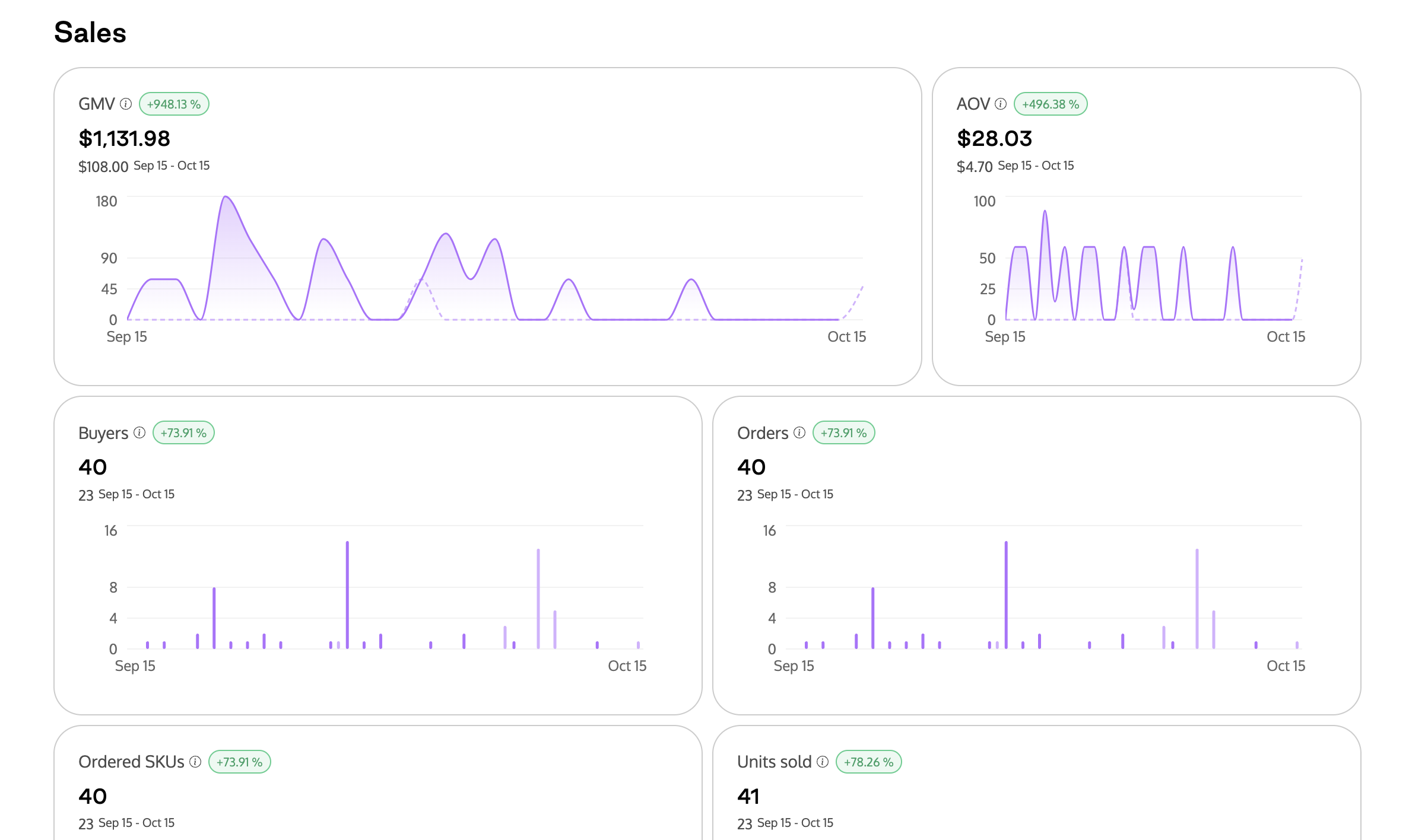
The dashboard displays all main metrics of your TikTok Shop, providing a clear view of performance through charts and graphs to help identify patterns, trends, and areas for improvement.
Automations
A range of triggers and customization options. Key highlights:
Trigger Types:
Creator status changes
GMV milestones
Sample requests
Advanced Filtering:
Apply full filters on creator characteristics such as followers and GMV.
Custom Flows & Templates:
Build fully customized automation flows or streamline processes using our pre-built templates. For example:
Creator Invited: If no response after 7 days, send a follow-up message.
Sample Request Approved: Notify the creator their sample is on the way.
Content Pending: Product delivered but no content posted? Send a gentle nudge.
Content Completed: Post is live! Send a thank-you message and request the Spark Ads code.
Email Automations:
All creator emails are now integrated into Creator Management. Trigger email automations based on TikTok Shop actions—for instance, auto-send an invite to your communities when a creator posts.
Here are explanations of the statuses of the creators in the automations engine:
⚪ Pending
You’ve identified this creator but haven’t sent an invitation yet.
🟡 Invited
You’ve sent a collaboration invite to the creator, but they haven’t taken any action yet.
🟣 Already Invited
This creator has already been invited to the same collaboration—no further action needed.
⚫ Unavailable
The creator can’t be invited due to ineligibility, an existing deal, or other restrictions.
🟠 Sample Pending
The creator has requested a sample that’s waiting for your approval.
🟢 Sample Approved
You’ve approved the creator’s sample request, and it’s ready to move forward.
🚚 Ready to Ship
The sample is approved and being prepared or shipped to the creator.
🔵 Content Pending
The creator has received the product and is currently creating their content.
✅ Completed
The creator has successfully posted and fulfilled all deliverables for this collaboration.
❌ Rejected
The invitation or sample request was declined by the brand or creator.
⚪ Cancelled
This collaboration has been cancelled—either by you or the creator.
💫 Showcase Only
The product is visible for creators to showcase but isn’t tied to an active collaboration.