Identify the creator on the sign-up form through Instagram Verification
Last updated: June 16, 2026
Requiring creators to authenticate their Instagram Business profile before completing the sign-up form ensures that only verified account owners are accepted into your program. This adds an extra layer of trust, security, and credibility for both brands and creators.
Why Enable Instagram Verification?
Instagram authentication helps protect your program from fraud, impersonation, and fake applications.
Many creator programs now use Meta's authentication process to verify that the person applying actually owns the Instagram account they're claiming to represent. This helps ensure that creators receive credit for their own accounts and prevents bad actors from applying on behalf of someone else.
To complete authentication, Instagram accounts must be connected to a Facebook account through Meta. This connection allows Meta to verify account ownership directly and provides brands with accurate, first-party account information.
Even if a creator does not actively use Facebook, having a Facebook account connected to a professional Instagram account has become a standard part of managing a creator business and is required for many creator marketing, affiliate, and partnership platforms.
If an Instagram account is not yet connected to Facebook, creators can set this up through Meta's Account Center and return to complete authentication afterward.
For more information on connecting a professional Instagram account to Facebook, visit Meta's guide:
https://www.facebook.com/business/help/898752960195806?id=419087378825961
How It Works
Here's what happens in practice:
A fraudster filled out your sign-up form last month using the handle @test, before IG authentication was enforced.
Today, your brand enables the Instagram Authentication requirement, which will now verify all new applicants.
The real owner of the @test handle applies to your form.
Since that handle already exists in the system, Superfiliate blocks this action to prevent the real account from being linked to the fraudulent profile.
How to Activate Instagram Verification on the Sign-Up Form
Go to Experiences for the program.
Navigate to Portal → Sign-Up Form → IG Authentication.
Switch the setting to Enabled.
Click Save.
Publish the updated experience.
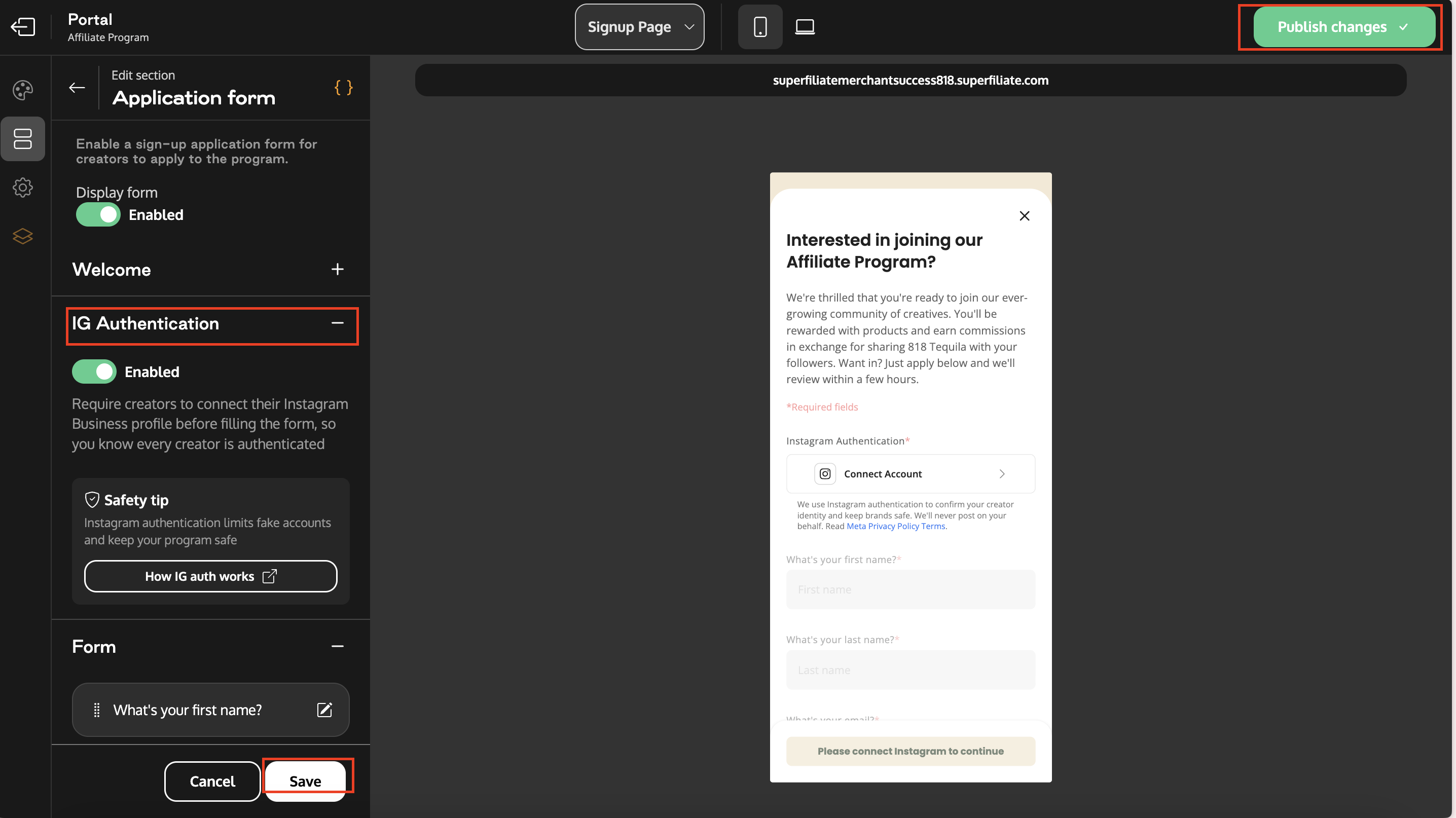
Important: Don't forget to save and publish the new experience. Publishing is required for the changes to take effect.